


M-Genie
To many, Google Workspace is a productivity tool. To large organizations like University of Michigan, it's the only thing standing between a functioning institution and total administrative chaos.
M-Genie is an in-house web application that lets U-M Google users manage file permissions and execute bulk actions, built to address both the friction of native Drive workflows and the university's data privacy requirements.
The LedeAn Overview
Updating a few file permissions on Google Drive is simple. Managing them across thousands and thousands of files in a large workspace is not. Such is the reality of administrative procedures at almost every large institution — and the University of Michigan is no exception.
Removing a single user from your Google Drive files shouldn't take days. At U-M's scale, it did.
I was officially brought on as a Frontend Developer, but my day-to-day responsibilities ultimately extended into product territory:
- UX design and wireframing: Co-led the dashboard layout direction, owning the Figma wireframing and contributing to iterative design sessions with our CAEN sponsors.
- Engineering requirements: Independently drafted the full engineering requirements document, synthesizing input across frontend, backend, and DevOps into a single reference the team built against.
- Technical coordination: Ran regular check-ins with both subteams via GitHub Issues, tracking implementation progress and flagging integration dependencies before they became blockers.
In BriefThe Problem
For our sponsor, CAEN, the tedious file management problem surfaced in the form of a seemingly simple administrative task: remove all permissions of a recently-retired senior staff member, who had worked in the organization for 20+ years, from any and all files.
Many of you are probably thinking: "It can't be that bad." This was certainly what I thought, too. Yet, when the team began their scavenger hunt of shared files, what they thought would be a boring couple of hours became days and days of frustration.
Could this be attributed to the tens of thousands of files that a staff member inevitably accrues when they've been on the organization since its founding days? Perhaps. But this isn't an uncommon story for U-M by any means. U-M's strong tenure for professors and long-term appointments of staff makes retirement events such as these a common occurrence.
With this in mind, it becomes clear that the issue here is no longer about an edge case. Instead, it's a debilitating pain point in U-M employees' day-to-day workflow. The result is a process — tedious and repetitive, albeit necessary — that hinders them from carrying out their jobs more efficiently.
Field NotesOur Process
Our research of existing solutions and Google Drive's API documentation surfaced three compounding problems, each ruling out a different category of off-the-shelf fix:
The interface
The Drive native UI offloads its system complexity onto the user.
Permissions can be direct or inherited from a parent folder, and the two behave differently in the interface. Controls that work on one file are greyed out on another with no clear reason why. Every judgment call falls back on the person doing the cleanup.
The API
Google's own API offers no shortcut.
There is no bulk permissions endpoint. Every removal requires a separate API call per file, per user — which makes scripted workarounds unsustainable at the scale of a large organization's shared workspace.
Third-party tools
External tools trade one friction for another.
Tools like BetterCloud or GAT+ exist for workspace management, but deploying them at a public university means navigating a lengthy procurement process and, more importantly, data privacy concerns.
Developing an in-house tool is the most logical choice for U-M's case.
After discussing with current U-M staff, I mapped out a user diagram workflow to illustrate the average offboarding process that existing employees must conduct when a community member leaves.
From there, I owned two decisions (and one unexpected detour) that shaped what became the final product.
By the midway point, two interfaces had been built in parallel. The first was a backend testing build generated by an AI model from our Figma wireframes; the second was a production prototype built by the frontend team. As the member most familiar with both the design and the requirements, I took it upon myself to integrate our two versions into a single, cohesive product.
Below, you can find my compare-and-contrast analysis of the two builds, and the tradeoffs I had to consider when prioritizing features from each version.
Backend testing build
AI-generated from team Figma wireframes for backend testing purposes.
Frontend production build
Built by the frontend team
tap a tag to read the full reasoning
In PrintWhat Shipped
The result: a fully integrated, production-ready M-Genie web application that is, as of Summer 2026, deployed and handed off to CAEN for usability testing. The following is a snapshot of the shipped product, with a few feature breakdowns and their use cases.
For the final product, we landed on a merge between the two builds:
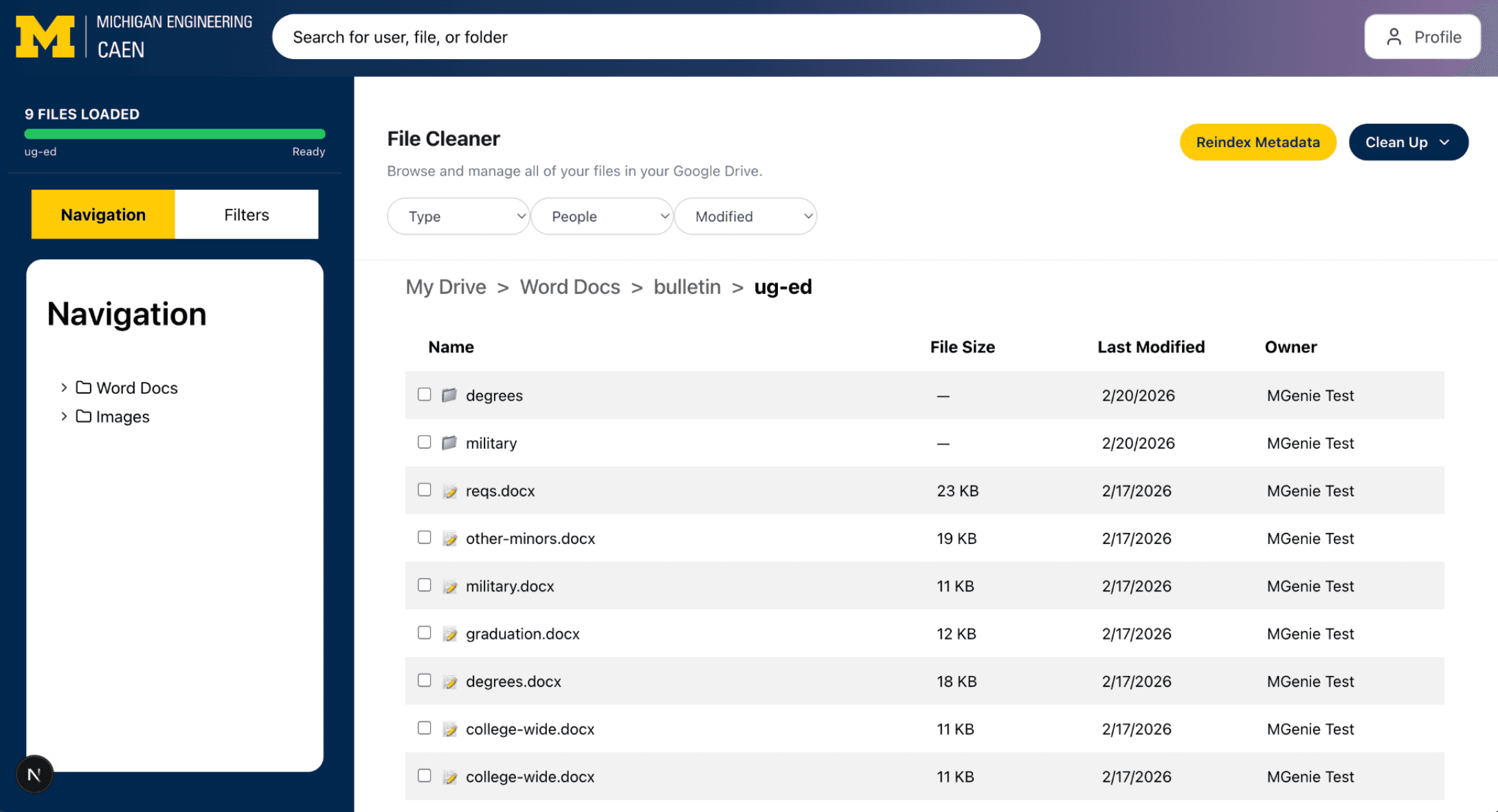
- The overall dashboard layout (left) follows our Figma wireframes and production build where it features a "Navigation" / "Filter" left sidebar and a file table view for the main content. Upon selecting a file, a bulk action bar appears at the bottom, allowing users to delete, edit permissions, or move files.
- Above the main table view is a "Clean Up" menu, which is a feature surfaced by the AI-generated build. It allows users to quickly filter files by three categories: Smart Suggestions, Duplicate Files, and Old Files. The "Smart Suggestions" category is powered by a custom algorithm that flags files for review based on their last modified date, size, and other metadata.
- A notable merged feature is also the the two filtering methods that exist. The "Filters" option on the left sidebar is a more traditional filter that applies to the entire file tree, while the pill-shaped filters above the table view are quick filters that apply to the current view. This distinction allows users to quickly narrow down their file list without losing the content of their current view.
Manage Permissions
Remove someone's access (regardless of permission inheritance)
SINGLE-FILE FLOW
permissions.delete() via Drive API
BULK-FILE FLOW
permissions.delete() × 3 files
One of the very first catalysts of this project, the "Manage Permissions" feature is our answer to the messy, tedious permissions management flow in the Google Drive native UI. M-Genie abstracts users' complicated permission roles into 3 simple clicks: select the files, input the target collaborator, and then hit "Remove," prompting M-Genie to remove the collaborator's access across the selected files regardless of inheritance through Google Drive's permissions.delete() method. Alternatively, the user could also manage collaborators' permissions per file, updating their access level or removing them entirely.
Post-action user feedback is then immediately surfaced on the UI, logging each action's success or failure.
Delete Files
Navigate with full autonomy and informed decisions
files.delete()
The need for M-Genie stems from user data protection and privacy. Needless to say, being transparent about M-Genie's authority behind the scenes is crucial to keeping user trust. Most actions that users take within the system are padded with a pre- and post-confirmation modal to ensure transparency first and foremost, and all results after system execution are logged immediately on the UI for visibility and stored within the account history for future reference. This is especially important as an in-app "Undo" rollback feature is explicitly set out of scope.
PostscriptReflections & Takeaways
Although M-Genie as a project has yet to be fully completed, the first semester had already yielded a number of lessons learned that I will be sure to carry forward into future projects and even in my daily collaboration work.
- Convergence, not parallel work. Our team was split into two with the intention of eventual integration; however, we kept pushing off our merge that we eventually built two working versions of the same product, and merging the two became its own project, which is the exact failure mode that continuous integration exists to prevent. The "divide and conquer" method should be anchored around a specified convergence point, rather than delayed or pushed back.
- Accessibility as a design foundation. More than 90% of public web pages and mobile apps fail to adhere to WCAG 2.0 standards. When AI is trained on such error-prone data, it comes as no surprise that AI-generated frontend builds almost always come with accessibility issues. We built M-Genie with accessibility as a design constraint, which makes post-build remediation seamless and efficient rather than a costly and time-consuming afterthought.
- Proactive communication is key. While GitHub's CI/CD pipeline is not hard to learn, the amount of effort needed for cross-team coordination is. This usually includes communicating clearly about what's in a pull request, when it's ready to merge, and who needs to weigh in before it does. The tooling's effectiveness only goes as far as your team's communication skills are.
- Keep the ceiling low so the floor holds. Being deliberate about requirements meant being honest about what the MVP actually needed to do, and resisting the pull to promise more than that. Our sponsors' technical background really helped as they kept the goal explicit throughout the project, steering clear of any scope creep and keeping us on track with the timeline.